Learningopps
Literacy Gold.
Supporting reading, writing, spelling and times tables.
Literacy Gold
Supporting a love of reading.
As part of our continuing focus on engaging our young people to develop a love of reading, Learning Opportunities is trialling Literacy Gold with our Year 7, 8 and 9 pupils.
Literacy Gold supports pupils with their reading, writing and spelling, along with learning their times tables.
Literacy Gold is an online programme that can be used on a laptop, computer or iPad. Each programme takes around 10–15 minutes to play.
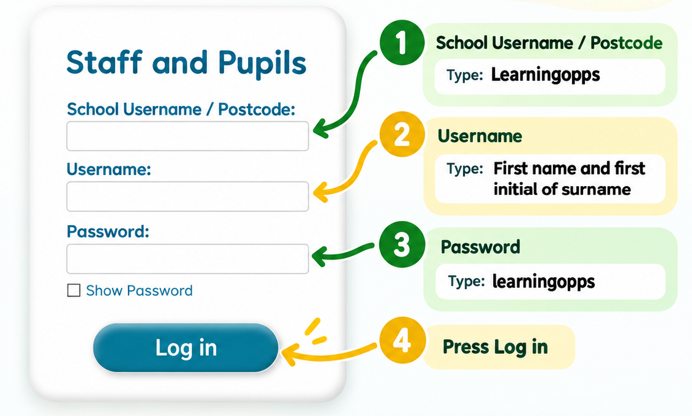
Literacy Gold login guide.
Supporting progress
At school and at home.
Literacy Gold sessions are targeted in school for pupils taking part in the programme.
Parents and carers can also support pupils at home by encouraging them to complete additional sessions and by talking to them about what they are doing and learning.
Once logged in, pupils can choose which programme they should play.
Login information
Getting started.
Pupils will need the following information when logging into Literacy Gold.
First name and first initial of surname
Use the pupil's first name followed by the first initial of their surname.learningopps
Open Literacy Gold
Use the Literacy Gold login page to access the programme.
Parents & Carers
Literacy Gold Parent & Carer Guide.
The Parent & Carer Guide provides further information about using Literacy Gold at home and supporting your child with the programme.
Short sessions
Each Literacy Gold programme takes approximately 10–15 minutes to complete.
Choose a programme
Once logged in, pupils can select the programme they have been asked to complete and begin their session.
Interventions